docker镜像加速
针对近期docker镜像库无法访问的问题(即docker pull拉取超时),下面介绍3种缓解方案:
配置docker国内镜像加速
阿里云-加速器地址:https://<你的ID>.mirror.aliyuncs.com
华为云-加速器地址:https://<你的ID>.mirror.swr.myhuaweicloud.com
腾讯云-加速器地址:https://mirror.ccs.tencentyun.com
网易云-加速器地址:https://hub-mirror.c.163.com/
七牛云-加速器地址:https://reg-mirror.qiniu.com/
中科大-加速器地址:https://docker.mirrors.ustc.edu.cn/
清华大学-加速器地址:https://mirrors.tuna.tsinghua.edu.cn
- 下面以阿里云为例,配置国内镜像加速:
mkdir -p /etc/docker
echo '{ "registry-mirrors": ["https://bftllzk2.mirror.aliyuncs.com"] }' > /etc/docker/damon.json
systemctl daemon-reload
systemctl restart docker

#.测试一下
docker pull nginx
利用vpn配置docker代理
- 利用某宝买来的vpn做转发,以实现docker镜像加速,示例 Trojan 启用 Share Over LAN
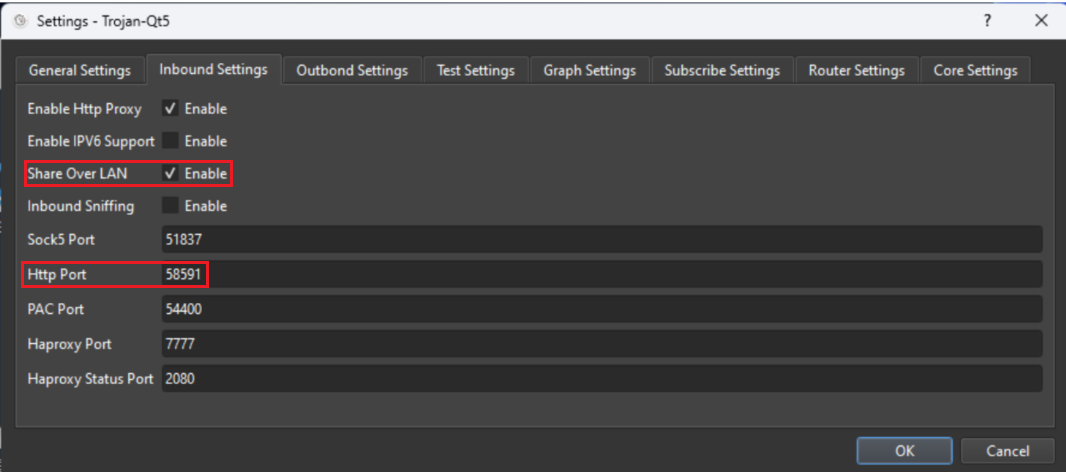
- 先配置vpn暴露的 Http Port 为docker代理服务端口,再重启docker服务
mkdir -p /etc/systemd/system/docker.service.d
echo '[Service]' > /etc/systemd/system/docker.service.d/http_proxy.conf
echo 'Environment="HTTP_PROXY=192.168.20.183:58591"' >> /etc/systemd/system/docker.service.d/http_proxy.conf
echo 'Environment="HTTPS_PROXY=192.168.20.183:58591"' >> /etc/systemd/system/docker.service.d/http_proxy.conf
systemctl daemon-reload
systemctl restart docker

#.测试一下
docker pull nginx
最新可用Docker国内镜像源加速列表(亲测有效)截至 2026-07
- 最新可用Docker国内镜像源加速列表(亲测有效)截至 2026-07-24
#.创建配置文件
mkdir -p /etc/docker
curl http://iso.sqlfans.cn/config/docker/daemon.202504.json > /etc/docker/daemon.json

#.重启docker服务
sudo systemctl daemon-reload
sudo systemctl restart docker

#.测试一下
docker pull nginx